
How to Backup Your Tenant File Data on the Virtual Server
|
The Tenant File Virtual Server is backed up automatically on a weekly basis. However, it is important that you make your own backups as well. There will be a charge for a technician to restore your files for you, but you can do it yourself.
|
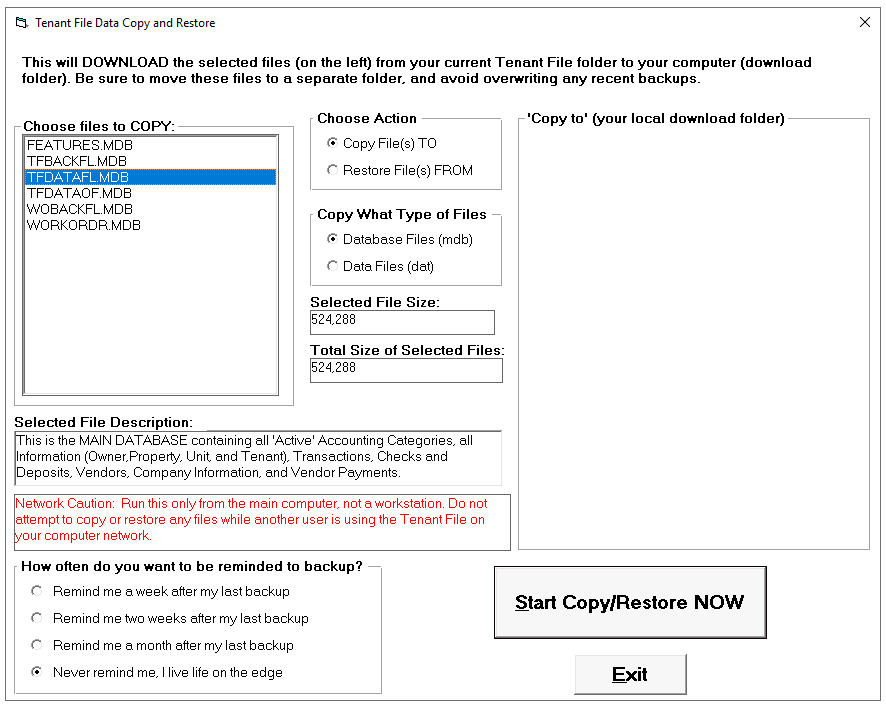
Virtual Server users don't even need to choose the 'destination' since it will be the 'Downloads' folder on their computer. The main database file (over 90% of your data) is already selected for you. This file is named TFDATAFL.MDB, and is definitely the file to backup often. However, you can choose to back up other files, such as the Inactive Tenant File (TFDATAOF.MDB), and the Features File (FEATURES.MDB). Also, you should back up your 'DAT' files, which are files that hold important settings, such as your account defaults, late fee charge settings, bank information and other preferences.
Your destination will always back up to your local 'Downloads' folder, then from there you can copy the file to any other media, such as a flash drive or USB drive.
NOTE FOR VIRTUAL SERVER USERS: If you already have older backups in your 'Downloads' folder, Windows will automatically assign a number to the file, such as TFDATAFL(2).MDB. In order for that file to be 'Restored' to the Tenant File, you will need to rename the file without the number and parentheses, such as TFDATAFL(2).MDB renamed to TFDATAFL.MDB. Be VERY careful when 'Restoring File(s) FROM' since that will OVERWRITE ALL OF YOUR CURRENT INFORMATION!
The Tenant File can remind you when it is time to back up your data. Just select one of the choices in the bottom left corner. Whenever you exit the program, it will check to see if it is time for another backup and take you to the correct screen to complete the backup.
Your destination will always back up to your local 'Downloads' folder, then from there you can copy the file to any other media, such as a flash drive or USB drive.
NOTE FOR VIRTUAL SERVER USERS: If you already have older backups in your 'Downloads' folder, Windows will automatically assign a number to the file, such as TFDATAFL(2).MDB. In order for that file to be 'Restored' to the Tenant File, you will need to rename the file without the number and parentheses, such as TFDATAFL(2).MDB renamed to TFDATAFL.MDB. Be VERY careful when 'Restoring File(s) FROM' since that will OVERWRITE ALL OF YOUR CURRENT INFORMATION!
The Tenant File can remind you when it is time to back up your data. Just select one of the choices in the bottom left corner. Whenever you exit the program, it will check to see if it is time for another backup and take you to the correct screen to complete the backup.