Built-in Backup Feature
With the Tenant File software, backing up all of your most important information is quick and easy.
While the server routinely makes backups, we highly recommend that you make your own backups as well. We understand how important all of your data is to the smooth operation of your business. That is why we offer built-in backup features. You can even set a reminder that keeps track of the last time you made a backup, and reminds you on a set interval.
Is It Easy?
One of the questions we hear a lot is “How easy is it to back up data with the Tenant File software?” Our answer is: VERY! We know how important this information is to any property management company. We understand that, should you lose your list of tenants, rents due and other information, it could cause your office to come to a complete standstill. That is why our residential management software with built-in backup features is very easy to use. We want to encourage our users to perform backups on a regular basis. One way we encourage that is by making the process as simple as possible.
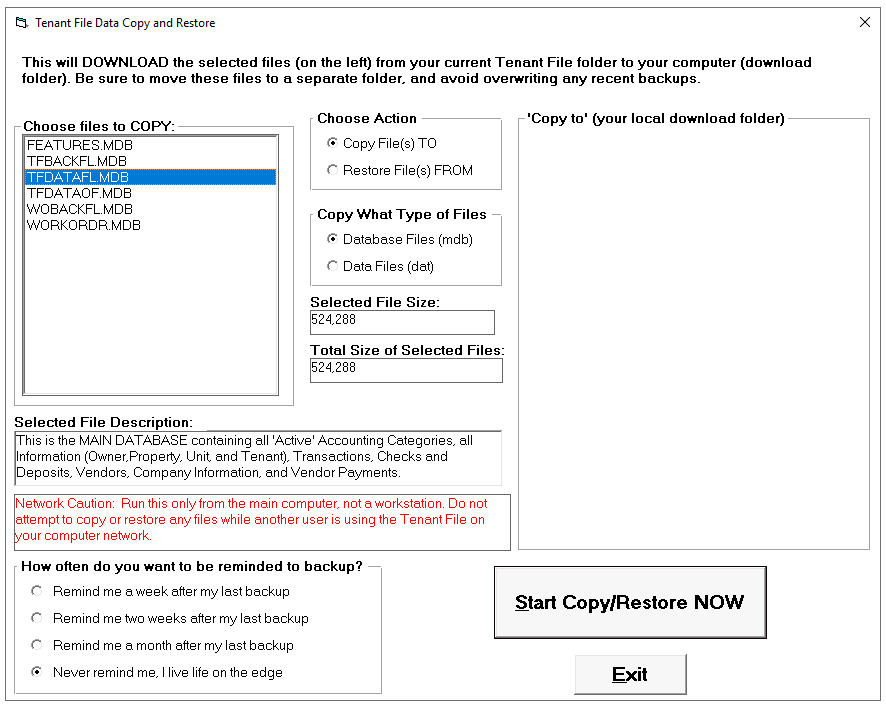
Simply click on the file to Copy, and start! The files will be downloaded to your local 'Downloads' folder.
Where do I Back Up the Files to?
You can paste the downloaded the files to another spot on the hard drive, to a CD, jump drive or network drive. The choice is yours. You can choose a different location for each backup, to maximize the security and help you be sure that you’ll always have access to the information that you need. We recommend that you back up to several locations and keep a copy off of the premises.
Restoring Data
Performing backups is only half the story. You also need to be able to easily restore the data, should it be lost. The Tenant File software has that covered, as well. All it takes to restore your data, are a few clicks -- and you’ll be back in business. Just remember that if you restore your data it will overwrite any existing data, as of the date of the restore file. Be very careful! This action is not reversable.
Don’t lose your crucial information to theft, fire or computer crashes. Let the Tenant File software keep all of your data safe and secure.
One of the questions we hear a lot is “How easy is it to back up data with the Tenant File software?” Our answer is: VERY! We know how important this information is to any property management company. We understand that, should you lose your list of tenants, rents due and other information, it could cause your office to come to a complete standstill. That is why our residential management software with built-in backup features is very easy to use. We want to encourage our users to perform backups on a regular basis. One way we encourage that is by making the process as simple as possible.
Simply click on the file to Copy, and start! The files will be downloaded to your local 'Downloads' folder.
Where do I Back Up the Files to?
You can paste the downloaded the files to another spot on the hard drive, to a CD, jump drive or network drive. The choice is yours. You can choose a different location for each backup, to maximize the security and help you be sure that you’ll always have access to the information that you need. We recommend that you back up to several locations and keep a copy off of the premises.
Restoring Data
Performing backups is only half the story. You also need to be able to easily restore the data, should it be lost. The Tenant File software has that covered, as well. All it takes to restore your data, are a few clicks -- and you’ll be back in business. Just remember that if you restore your data it will overwrite any existing data, as of the date of the restore file. Be very careful! This action is not reversable.
Don’t lose your crucial information to theft, fire or computer crashes. Let the Tenant File software keep all of your data safe and secure.